


Google Maps
3.2677.59K Reviews
App Specs
- Version
- Varies with Device
- Updated On
- License
- Free
- Downloads
- 10,000,000,000+
- Developer
- Google LLC
- Categories
- Travel & Local
- Platform
- Android, iOS
Screenshots
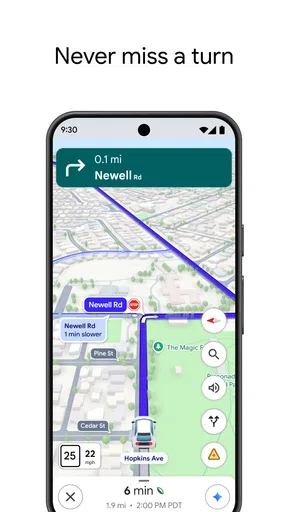
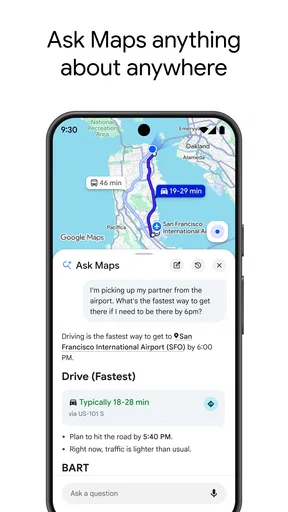
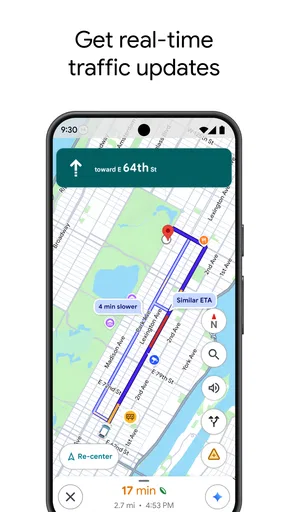
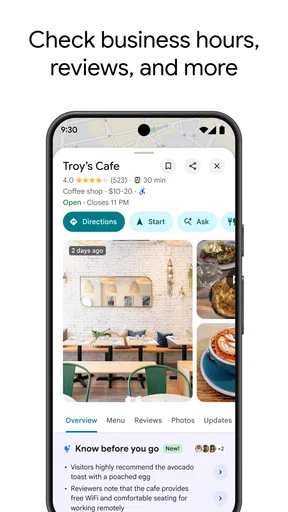
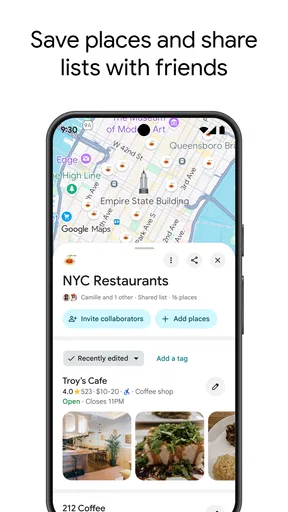
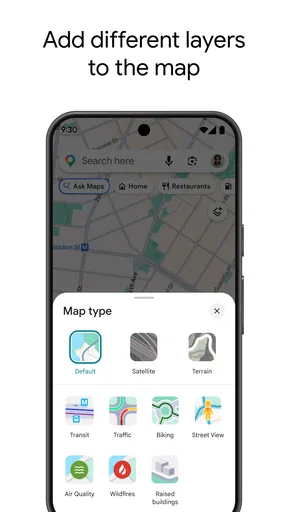
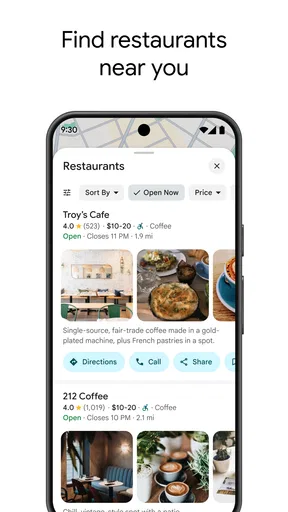
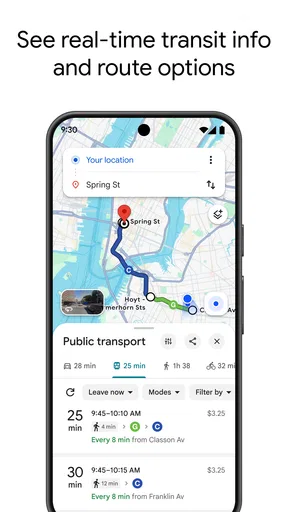
 Analysis by AppCompare
When I rely on a map app, I’m trusting it with more than directions: it can shape where I go, what I notice, and how much attention I give my phone along the way. Google Maps is a familiar choice for that job, but I find it works best when I treat its suggestions as useful guidance rather than unquestionable answers. That distinction matters most when a trip involves unfamiliar streets, a tight connection, or personal location details.
Trust is part of the route
Google Maps is a free travel and local-discovery app from Google LLC, and its broad reach is easy to see: it has over ten billion installs, around nineteen million ratings, and an average rating of about 3.2. Those figures tell me it is widely used, not that every route or recommendation will suit every person. I would rather check the details that matter to my trip than assume popularity guarantees a perfect result.
Its age rating is Everyone, so it is presented for a broad audience. That does not remove the need to make thoughtful choices about location use or what I share. When a route depends on being found accurately, I pay attention to what the app is asking me to do and decide whether that makes sense for the moment.
Guides and Analysis on Google Maps
Choices matter more than assumptions
I’m careful not to confuse the convenience of a map with a reason to share more than I intend. Before starting a trip, I consider whether I need live guidance, whether I can plan the route first, and whether location sharing with another person is genuinely useful. Those are practical choices I can make around the app, not claims about hidden settings or policies.
For a low-stakes errand, I may simply search for a destination and follow the route. For a sensitive journey, I prefer to think through what I need before opening the map and keep my phone use purposeful. A navigation screen can be helpful without becoming the place where I make every decision about my day.
When the details deserve a second look
Search results and local suggestions are a starting point, not a guarantee that a place is open, accessible, or the best fit for me. I look at the available reviews and photos, then use my judgment rather than treating a popular result as a personal recommendation. For an important meal or appointment, I check the destination carefully before setting off.
Routes also depend on the conditions around a trip. Real-time traffic can help when roads are busy, but I still watch for signs, closures, and changes on the ground. In unfamiliar places, I like to inspect the destination beforehand with Street View when it is available; recognizing a storefront or entrance can make the final approach less stressful.
Worth Reading Before You Choose

ESPN’s Live Game View Makes Following Close Games Easier

QuizzLand Review: A Good Fit for Short Trivia Breaks, Not Every Player

Basketball Stars: Multiplayer Is Fast, but Can It Recover When Matches Go Wrong?

WEBTOON Turns Phone Updates Into a Better Reading Routine

Link to Windows Runs on Shared Habits, Not Social Feeds

How Alibaba.com Dominates the B2B Marketplace
A practical companion, with limits
As a Travel & Local app, Google Maps brings navigation together with nearby places and activities. The combination is useful, but it can also put a lot of information on one screen. I get the most from it when I decide whether I’m navigating, comparing places, or planning a day, rather than trying to do all three while walking or driving.
Getting Started with Google Maps
Downloading Google Maps is as easy as pie, available on both Android and iOS. Once you have it on your device, the interface is quite intuitive. You’re immediately greeted with a map of your current location, which is perfect if you’re directionally challenged like I sometimes am. Just enter your destination, and voilà, you're presented with multiple routes.
Features That Stand Out
One of the most impressive features is the real-time traffic updates. I can't count how many times this app has saved me from being stuck in a jam with its traffic rerouting. It’s like having a little helper in your pocket that knows the best shortcuts. Plus, the integration of public transit schedules is a game-changer, especially if you’re navigating a new city without a car.
The Street View feature is another fantastic tool. Whether you want to scope out the front of a restaurant or take a virtual stroll down Parisian streets, this feature adds a visual dimension that I find incredibly useful.
Exploring New Places
What I love about Google Maps is its ability to help you discover new places. It’s like having a local guide who’s always ready to show you the best spots around. With user reviews and photos, you get an insider’s perspective on restaurants, shops, and attractions. The app even suggests places based on your previous searches and interests, which has led me to some hidden gems I wouldn’t have found otherwise.
That discovery layer is also where I slow down. Reviews and photos can help me narrow a list, but they reflect other people’s experiences and may not answer my particular questions. If I’m choosing somewhere for a quiet conversation, a specific dietary need, or a time-sensitive visit, I use the listing to shortlist options and then verify the detail that matters to me.
The Offline Map Feature
One of my favorite features, especially when traveling abroad, is the ability to download maps for offline use. I remember a trip where my data plan wasn't cooperating, and this feature was a total lifesaver. Just download the area you need, and you can access the map without any internet connection.
The useful habit here is to prepare before leaving reliable Wi-Fi: choose the area that covers both the destination and the surrounding streets you may need, rather than saving only a tiny patch around one address. Offline maps are a sensible backup for a data gap, but I would not plan on every online convenience behaving the same way without a connection. If I’m heading somewhere with uncertain coverage, I also note the route and destination details before setting out.
Navigation and User Interface
The navigation system is straightforward. Whether you’re walking, driving, or cycling, Google Maps provides clear directions. The voice-guided navigation is particularly handy, allowing you to keep your eyes on the road. The user interface is clean, and the controls are easy to use, making it accessible for everyone.
For a driver, I recommend setting the destination and reviewing the route before moving, then following spoken instructions instead of handling the phone in traffic. For a pedestrian, the trade-off is different: a map can make a new neighborhood easier to navigate, but repeatedly staring at the screen makes it harder to notice crossings and surroundings. I use the directions to get oriented, then look up and check the street itself.
A realistic example is arriving in a city by train, with a hotel check-in and dinner both ahead. I can compare a walking route with transit options, inspect the hotel entrance in Street View if available, and save an offline map before leaving a dependable connection. Once outside, I follow the route but keep the station signs and local instructions in view. That small amount of preparation reduces phone-fiddling without pretending the map can anticipate every change.
Integrated Services and Connectivity
Google Maps isn't just about finding your way. It integrates seamlessly with other Google services, such as Google Calendar and Gmail, which means your appointments and reservations can automatically pop up in the app. This connectivity makes planning your day a breeze.
That convenience is most useful when I already organize plans through those services; it can reduce the effort of searching for an address again. If I prefer keeping travel plans separate, I can still enter a destination directly. I would not choose an app solely for calendar integration, though: the important question is whether having those details appear in the map fits my own planning habits.
Moreover, the app is constantly updated, ensuring that the information you receive is accurate and reliable. With the ability to share your location with friends and family, it also adds a layer of security, especially when you’re out and about.
Location sharing is a choice I reserve for situations where another person needs to know where I am, such as coordinating a meeting or helping someone follow my arrival. I think of it as a practical convenience, not a substitute for ordinary safety judgment. Before sharing, I make sure I understand who needs the information and why; when coordination is over, I reassess whether continuing to share still serves a purpose.
Who will get the most from it
I’d recommend this app to people who move between driving, walking, cycling, and public transit, or who like checking nearby places while planning a day out. It is especially handy when a trip combines several stops, because directions and local discovery live together. A visitor can use it to get oriented, while someone at home may value traffic-aware routing for an unfamiliar part of town.
It is not automatically the best choice for everyone. If you want a navigation tool with a narrower purpose and fewer discovery prompts, a dedicated route-planning app may feel calmer. If your priority is a region-specific transit authority’s most authoritative service updates, that agency’s own app can be a better companion for that part of the journey. I would also skip relying on any single map when the consequences of a wrong turn are high; check signs and current local guidance.
How it compares with other map options
Compared with a basic map app, Google Maps’ appeal is the way it combines route choices, traffic context, transit, Street View, and place discovery. That breadth means I can move from finding an address to judging the area around it without switching tools. The trade-off is that a broad app can feel busy, and its recommendations may not be as focused as a specialist directory or a transit operator’s own information.
For a simple trip on familiar streets, the default map already on a phone may be enough, especially if I value a straightforward interface over exploring nearby businesses. For a road journey where live traffic is central, Google Maps is a strong everyday option, but I still compare the proposed route with road signs and common sense. For a long trip with patchy service, the offline map is worth preparing, while a paper backup or written directions can be reassuring in places where a phone is not dependable.
Final Thoughts
In my opinion, Google Maps is more than just a navigation app; it's a comprehensive travel companion. Whether you're exploring your hometown or venturing into new territories, it offers everything from directions to discovery. The ease of use combined with its robust features makes it a must-have app on any smartphone.
If you haven't yet explored all that Google Maps has to offer, I highly recommend giving it a try. You'll find that it's not just about getting from point A to B, but about enhancing your entire travel experience. So go ahead, download it, and start exploring the world with confidence.
My cautious verdict
I see Google Maps as a capable free option for everyday navigation and finding places, not as an authority that should make every choice for me. Its broad reach and average rating of around 3.2 suggest a widely used app with mixed user experiences, so I would judge it by how well it handles my own routes. The Everyone age rating makes it broadly suitable, while personal comfort with location-related choices remains individual.
My advice is to use it actively: check a route before leaving, prepare offline coverage when connectivity may be weak, treat place listings as leads, and share location only when it helps with a clear purpose. If those habits suit you, it can be a very useful companion. If you want a more focused tool, rely on a local transit source for service-specific details, or simply prefer not to combine navigation and discovery, another option may fit better.
Pros
- Accurate real-time traffic updates.
- Extensive global coverage of locations.
- Easy integration with other apps.
- Offline maps for data saving.
- Street View provides detailed visuals.
Cons
- Can drain battery quickly.
- Requires internet for best features.
- In-app ads may be distracting.
- Occasional GPS inaccuracies.
- Limited customization options.
FAQs for Google Maps
What features does Google Maps offer for navigation?
Google Maps provides turn-by-turn navigation, real-time traffic updates, and multiple route options. It also offers public transportation directions, biking routes, and walking paths. Users can access offline maps for areas without internet and explore street-level imagery with Street View. Additionally, it suggests nearby points of interest like restaurants and gas stations.
How accurate is Google Maps for real-time traffic updates?
Google Maps uses data from various sources, including user-reported incidents and historical traffic patterns, to offer real-time traffic updates. While generally accurate, factors like sudden road closures or accidents can affect precision. It's advised to check alternate routes and updates regularly to ensure the best travel experience.
Can I use Google Maps offline, and how do I download maps?
Yes, Google Maps allows offline usage by downloading maps of specific areas. To download, search for the desired location, tap on the location name, and select 'Download.' Ensure you have sufficient storage space and periodically update offline maps to access the latest data, as updates might not occur automatically.
Is Google Maps available on both Android and iOS devices?
Google Maps is available for both Android and iOS platforms. It offers similar functionalities across both systems, although there might be slight interface differences. Regular updates ensure feature parity and improvements. Users can download it from the Google Play Store for Android devices and the Apple App Store for iOS devices.
How does Google Maps ensure user privacy and data security?
Google Maps prioritizes user privacy by allowing control over location data sharing. Users can manage location history, turn off tracking, and use Incognito Mode for private searches. Google adheres to strict data protection standards, ensuring that personal information is handled securely according to its privacy policy.


